Connect your meeting rooms directly to Microsoft 365. Show live availability, book instantly from the screen, and manage everything from one admin panel.
Designed for modern workplaces. Simple to set up, powerful to manage.
📅
Live Microsoft 365 sync
Connects directly to Outlook via Microsoft Graph API. Meeting updates appear in seconds — no manual refresh needed.
⚡
Instant room booking
Book 15, 30, 45 or 60 minutes directly from the display. Drag to create custom slots. Appears in Outlook immediately.
🖥
Works on any screen
Runs in any browser — wall-mounted tablets, smart displays, ProDVX screens.
🏢
Multi-room management
Manage unlimited rooms from one admin panel. Each room has its own branding, schedule, and settings.
👥
Team access control
Invite team members and assign them access to specific rooms only. Full org and role management built in.
💡
LED strip control
Connect LED strips to show room status at a glance. Green for available, red for busy — visible from down the corridor. If your screen isn't supported yet, get in touch — we're happy to add and test it with you.
Themes
One tap-to-book screen, five looks
Pick the style that matches your space. Every layout includes the same on-screen controls: tap anywhere to book, plus circular buttons for Find a room, Call reception, and (when busy) End meeting early. Switch styles any time from the admin panel — no redeploy.
Available
Boardroom
11
12
13
14
15
16
1:1 with Sarah
11:30 – 12:30
Strategy Review
14:00 – 15:00
13:30
⛅ 18°C
Call
Tap anywhere to book
Available
Boardroom
2:34 PM
Tuesday, 7 April⛅ 18°C
Next · 4:00 – 5:00 PM
Strategy Review
2pm
3pm
4pm
5pm
6pm
4:00 – 5:00 PM
Strategy Review
Available
365Your brand
⛅ 18°C
Boardroom
Next: Strategy Review at 4:00 PM
14:34
Call
Tap anywhere to book
14:34
Available
Boardroom
Next: Strategy Review at 4:00 PM
Tap anywhere to book
Available
Boardroom
Next: Strategy Review · 14:00
365Your brand
13:30
⛅ 18°C
Call
Tap anywhere to book
365Your brand
14:34⛅ 18°C
Boardroom
In a meeting · until 3:30 PM
End meeting
Find
Call
Ocean
Sunset
Forest
Aurora
Coral
Plum
Midnight
Cyber
Side panel · timeline
Our recommended starter look. Dark side panel over your photo or video, with today's meetings as a ghosted day-schedule down the centre. Tap anywhere to book; drag the timeline to scan past or future hours.
How it works
Up and running in minutes
No complex IT setup. If you have a Microsoft 365 account, you're most of the way there.
1
Connect Microsoft 365
Your IT admin clicks a one-time consent link to authorise 365 Scheduler on your tenant.
2
Add your rooms
Enter your room mailbox email in the admin panel. One per screen — takes 30 seconds each.
3
Open the display URL
Open the display URL on any wall-mounted screen or tablet. No app, no install.
4
You're live
Meetings appear in real time. Staff can book rooms directly from the screen.
Built natively on Microsoft 365
365 Scheduler reads directly from Exchange Online via the Microsoft Graph API — no third-party calendar sync, no data export. Your meetings stay in Microsoft 365 where they belong.
Microsoft Graph API
Exchange Online
Azure AD Auth
Outlook Calendar
Reception screens
Turn your lobby into a smart welcome wall
A second screen type designed for receptions, lobbies, and waiting areas. Same admin panel, same Microsoft 365 connection, very different look.
Acme HQLondon EC2 · Reception
10:24:18Tuesday, 21 May
BBC NEWS
Markets Open Higher on Rate Pause
LIVE· Westminster — Chancellor's statement at 11:00
📰Live News
BBCBank of England holds rates steady as inflation cools to 2.1%
ReutersTech sector rally continues into third week on AI infrastructure spend
FTLondon office occupancy returns to 78% of pre-pandemic levels
🚇TfL Status
BakerlooGood
CentralGood
CircleMinor
DistrictGood
ElizabethGood
JubileeGood
MetropolitanSevere
NorthernGood
VictoriaGood
☁Weather
⛅
16°
Partly cloudyFeels 14° · 12mph SW · Rain by 16:00
Tue
☀
17°
Wed
⛅
19°
Thu
🌧
15°
Fri
🌧
14°
Sat
☀
18°
🏢Room Availability — Today
FoundryFree11:30
WorkshopIn use10:30
AtriumSoon10:15
Loft 2Free14:00
BoardroomIn use12:00
SketchFree—
BridgeSoon10:00
VaultFree—
📣Announcements
Welcome — Acme Industries visiting todayPlease sign in at reception. Lanyards provided.
Local forecast for your office postcode, updated every 15 minutes.
📰
News & RSS feeds
Show BBC, Reuters, or any RSS feed as a rolling ticker — or your own internal news.
📺
Live TV & video
Embed HLS streams or YouTube — perfect for muted news channels behind reception.
🚇
Transport status
TfL line status for London offices. Other transit APIs on request.
🏢
Room availability grid
All your meeting rooms at a glance — visitors can see which are free without asking.
🎨
Fully branded
Your logo, your colours, your background image or video. Looks like part of your space.
On-screen controls
Three buttons. Everything visitors need.
Every Theme 4 layout includes the same three circular controls — designed for unattended kiosks where simplicity wins.
Call reception
A tap on the bell button alerts your reception team instantly. The button stays lit and labels itself "Called" so the visitor knows the message went through.
✓ Real-time push to every logged-in receptionist
✓ Sound + taskbar flash + on-screen card
✓ Reception acknowledges → button updates to "On the way"
✓ Customisable label per screen (e.g. "Call security", "Call IT")
✓ State survives screen reload — alerts don't get lost
Find a room
When the current room is busy, the search button opens a list of every other room in your org with live status — visitors find an open room without asking anyone.
✓ Sorted by availability, then by name
✓ Shows capacity, floor, and next-meeting time
✓ Only visible when the current room is in use
End meeting early
Finished ahead of schedule? One tap releases the room back to Outlook — making it instantly available for the next team to book.
✓ Updates the Outlook event in seconds
✓ Disable per-screen if you'd prefer a stricter policy
✓ Visible only while a meeting is live
Plus tap anywhere on the screen to open the duration picker. When the room is busy, a tap opens the week view instead, so anyone can book a future slot.
Companion app
Concierge for receptionists
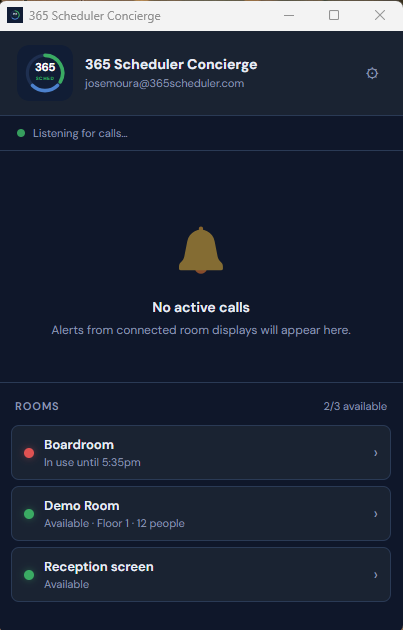
A free Windows desktop app that alerts your reception team the moment someone taps Call reception on any screen.
Always listening, never intrusive
Pin it to the corner of a reception monitor and forget about it.
When a visitor in any of your meeting rooms taps the bell, the app springs to life.
🛎
Real-time alert card — sound, taskbar flash, and a big card showing
which room is calling. One click acknowledges it and updates the room display
to "On the way".
🏢
Live room overview — every room in your org with current status,
occupancy, and next-meeting time. See at a glance who's free without leaving the desk.
🔊
Customisable sounds — bundled chimes or upload your own.
Optional loop-until-acknowledged so an empty desk never misses a visitor.
👥
Multi-receptionist coordination — if two people are logged in, the
first to acknowledge marks it handled for everyone.
🔒
Secure by default — signs in with the same account as the admin
panel, with email verification on new devices.
Windows 10 or 11 · Free with any 365 Scheduler plan
Optional companion app
Kiosk app for Android
Lock a wall-mounted tablet to the room display — no system bars, no escape, PIN-protected admin unlock. Most setups don't need this; a regular browser tab works fine.
We request only the minimum Microsoft 365 permissions needed to show room availability and create bookings.
📅
Calendars.ReadWrite
Read room calendar events to show availability, and create new bookings when a user reserves a room.
📍
Place.Read.All
Read room resource properties (capacity, location) to display room details on the booking screen.
🔒
No data stored
Calendar events are fetched live and never stored on our servers. Your meeting data stays in Microsoft 365.
🏢
Tenant isolation
Each organisation's credentials are completely isolated. No cross-tenant data access is possible.
FAQ
Frequently asked questions
Does 365 Scheduler read employees' personal calendar contents?
No. We only read events from the resource (room) mailboxes you configure. We never access individual user mailboxes or personal calendar contents. See our privacy policy for full details on what we access and why.
What hardware do I need?
Any device with a modern browser — wall-mounted Android tablets, iPads, Windows displays, or purpose-built panels like ProDVX. There's no app to install. For LED status strips we support WLED-compatible controllers. We can recommend hardware if you're starting from scratch.
How do I set up a ProDVX panel as a locked kiosk?
Install our Android kiosk app, pair the screen to its room, then promote the app to Android Device Owner so it boots straight into the display and fully locks down — no Home button, notification shade, or "Screen is pinned" message. On a ProDVX the status LEDs also follow the room automatically (green = free, red = busy). The one-time setup needs a factory-reset panel with no Google account and a single adb command. Full step-by-step instructions are on our kiosk app guide. To unlock or change settings on the panel, tap the top-left corner 10 times and enter your PIN.
Do I need Microsoft 365 to use this?
Yes — 365 Scheduler reads room availability directly from Exchange Online via the Microsoft Graph API. You need a Microsoft 365 Business or Enterprise plan with room mailboxes configured. Google Workspace is not supported (yet).
Meetings show the organiser's name instead of the real title. How do I fix it?
By default, Microsoft 365 room mailboxes delete the meeting subject and replace it with the organiser's name — a Microsoft privacy default. To show real meeting titles on your displays, a Microsoft 365 admin runs the commands below once per room. This is an Exchange Online setting (not Azure), and there is no admin-center toggle for it, so it has to be done in PowerShell:
Replace the admin and room addresses with your own. This affects new bookings only — meetings booked before the change keep their stripped title.
How long is the free trial and what happens after?
14 days, no credit card required. After the trial you choose Monthly (£7/screen/month) or Annual (£70/screen/year — 2 months free). You can cancel any time from the admin panel; service continues until the end of your paid period.
Where is data stored? Is it GDPR compliant?
Calendar events are fetched live from Microsoft 365 and never stored on our servers. Configuration data (your screen settings, members, billing) is held in Google Firebase in europe-west1 (Belgium). We're GDPR-compliant and act as data processor for our customers — a DPA is available on request.
Can I customise how the displays look?
Yes — five built-in themes (Light card, Gradient, Glass card, Side panel, Theatre), custom colours, your logo, background images or videos, and per-room branding. All managed from one admin panel without any redeploy.
Which languages are supported?
The display and admin panel currently ship in English, Portuguese, Spanish, French, German and Simplified Chinese. We add new languages on request — get in touch if you need one we don't have.
How does setup work? I'm not very technical.
Setup takes about 5 minutes if you have Microsoft 365 admin access. Your IT admin clicks a one-time consent link, you enter your room mailbox email, and you open the display URL on your tablet. That's it. We're available over email or video call to walk you through the first one if needed.
What's the Concierge desktop app for?
It's a free Windows app for receptionists. When someone in a meeting room taps the "Call reception" button on a display, the app pops up an alert with sound and a flashing taskbar icon. Same login as the admin panel, no extra licence.
What if I need help?
Email support is included on every plan. Annual subscribers get priority support. For larger rollouts we can join a video call to plan deployment and answer questions before you commit.
Ready to get started?
Set up your first room display in under 5 minutes. No credit card required for 14 days.